What Is an AI Agent?
An AI agent is more than a chatbot. It is an autonomous software system that perceives its environment, reasons about what to do, takes actions using tools, and works toward a goal, all without constant human direction.
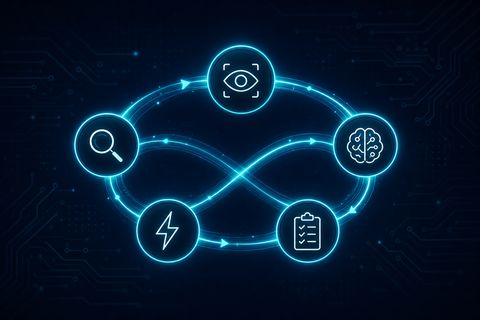
The difference between a basic LLM call and an AI agent is the loop. A chatbot answers one question and stops. An agent plans, executes, observes results, and plans again until the task is done.
In 2026, AI agents are being used to automate customer support, process documents, book appointments, scrape data, generate reports, and orchestrate entire workflows, all running without human involvement after the initial prompt.
Building your own agent is not as complex as it sounds. You need seven components, and this guide walks you through each one.
The 7-Step Architecture
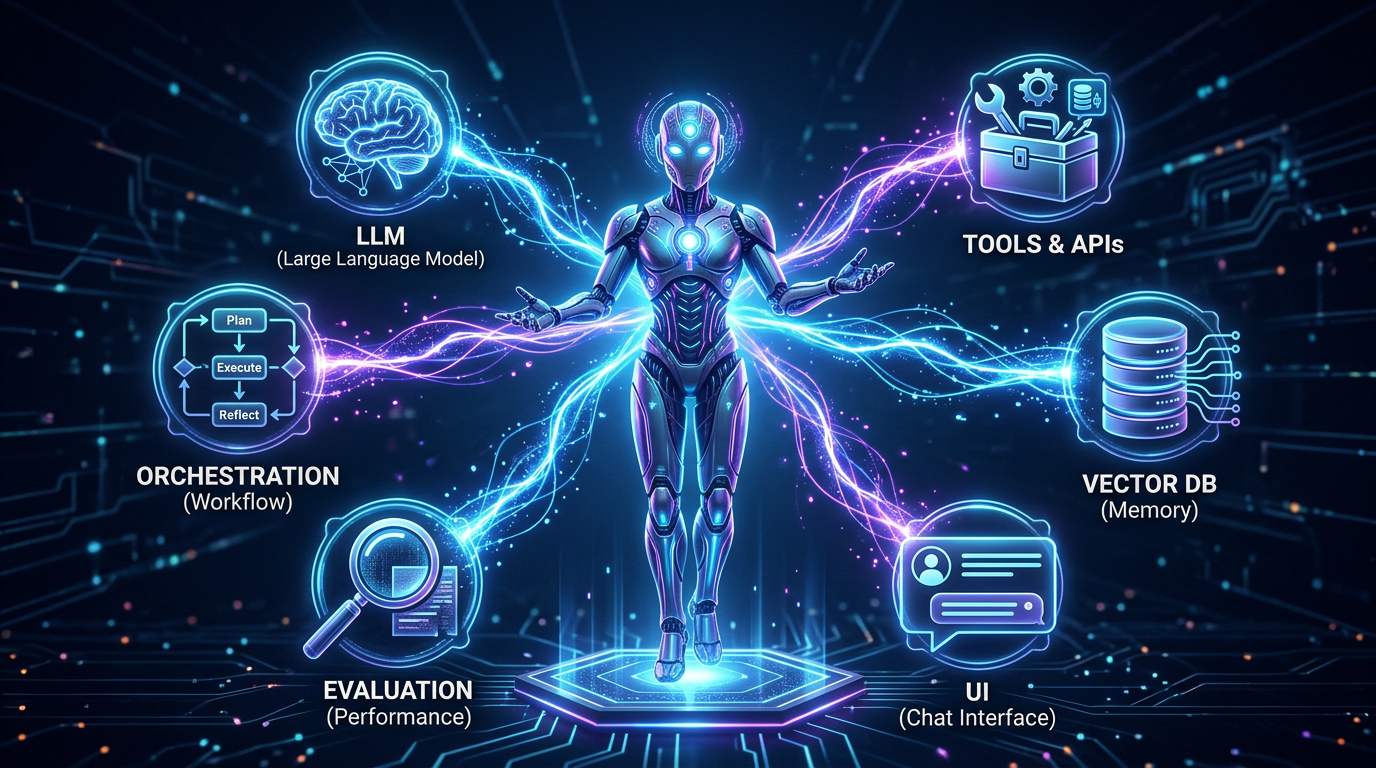
Every production AI agent, regardless of framework, has the same seven layers. Think of it as a stack: each layer builds on the one before it.
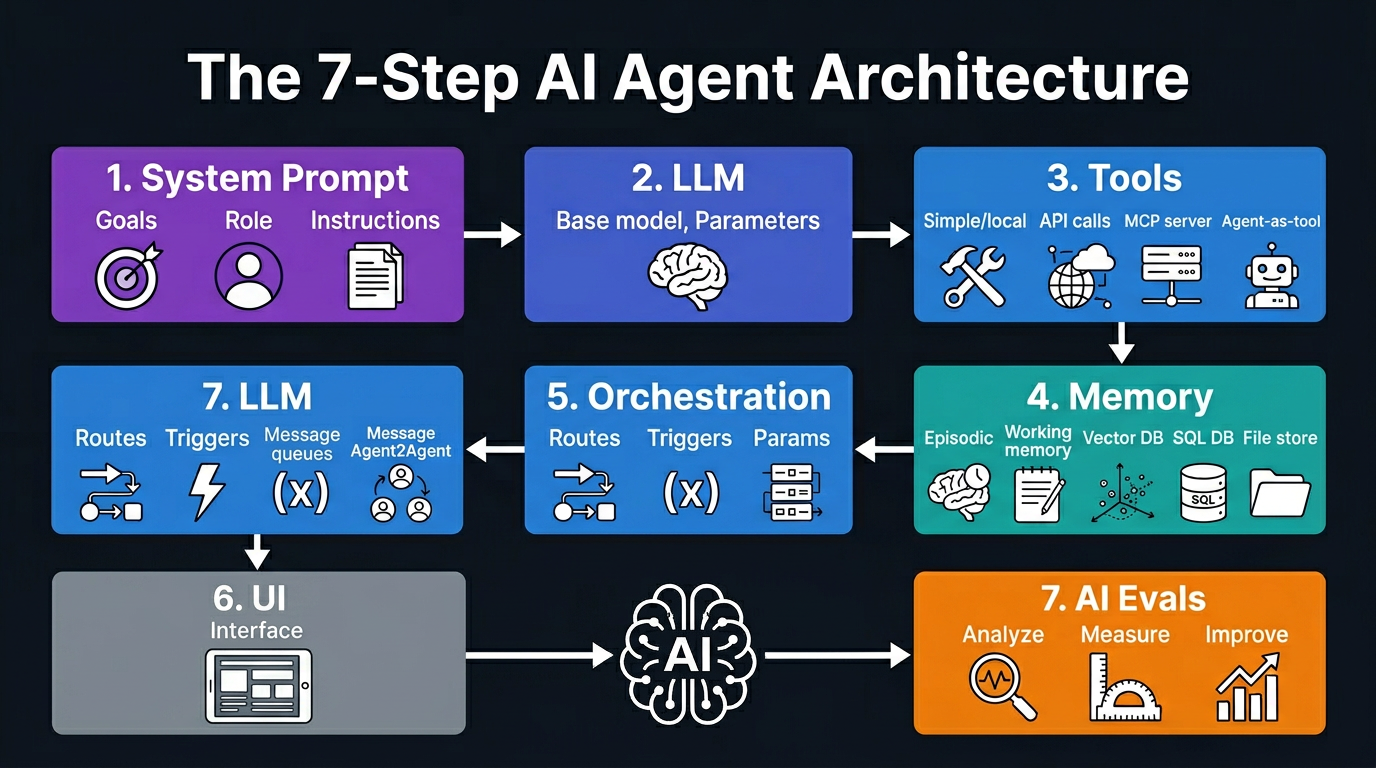
- System Prompt: Defines the agent's identity, goals, constraints, and behavior
- LLM: The reasoning engine, the model that decides what to do next
- Tools: Functions the agent can call (APIs, databases, search, code execution)
- Memory: Short-term context plus long-term retrieval from a knowledge store
- Orchestration: The logic that runs the think, act, observe loop
- UI: How users or other systems interact with the agent
- Evals: Automated testing to measure and improve performance
You do not need all seven on day one. Start with the first three, then layer in memory, orchestration, and evals as your use case grows.
Step 1: Design Your System Prompt
The system prompt is the most underrated part of building an agent. It tells the LLM who it is, what it can do, how it should behave, and what to avoid. A weak system prompt leads to an unpredictable agent. A strong one locks in consistent, trustworthy behavior.
A good system prompt has four parts:
- Identity: Who the agent is ("You are a customer support agent for Acme Corp")
- Goals: What the agent is trying to achieve ("Your goal is to resolve customer issues in under 3 messages")
- Tools: Which tools are available and when to use them ("Use search_kb to look up product info before answering")
- Constraints: What to never do ("Never make promises about delivery dates you cannot verify")
Here is a minimal system prompt for a support agent:
You are a support agent for Acme Corp.
Goals:
- Resolve issues in 3 messages or fewer
- Always greet the user by name if known
- Escalate if issue requires refund

Tools available:
- search_kb(query): search the knowledge base
- lookup_order(order_id): get order status
- escalate(reason): hand off to human

Never: make up order info, promise outcomes
you cannot verify, discuss competitors.
Save this prompt in a dedicated config file or environment variable. Never hardcode it into business logic, so you can update it without redeploying code.
Step 2: Choose Your LLM
The LLM is the brain of your agent. It reads the conversation, decides which tool to call, interprets results, and generates the final response. Choosing the right model depends on three factors: reasoning quality, speed, and cost.
| Model | Best For | Tool Calling | Cost |
|---|---|---|---|
| GPT-4o | Complex reasoning, multimodal tasks | Excellent | High |
| Claude 3.5 Sonnet | Long context, document analysis | Excellent | Medium |
| Gemini 2.0 Flash | Speed-sensitive, high-volume tasks | Good | Low |
| Llama 3.3 70B | Privacy-first, on-premise deployment | Good | Free (self-hosted) |
| Mistral Medium | European data compliance | Good | Low |
For most production agents, start with Claude 3.5 Sonnet or GPT-4o. Both have reliable tool-calling support, handle long contexts well, and are battle-tested in production. Once your agent is working, you can swap to a cheaper model if latency and cost become a concern.
The key technical requirement is structured output and native tool calling. Avoid models that do not reliably produce valid JSON for tool call parameters.
Step 3: Add Tools (The Hands of Your Agent)
Tools are functions your agent can call to interact with the outside world. Without tools, your agent is just a language model. With tools, it becomes an autonomous system that can search the web, query databases, send emails, book calendar slots, and execute code.
There are four categories of tools:
- Data retrieval: Web search, vector database lookup, SQL query, file read
- Action execution: Send email, create calendar event, write to database, call an API
- Code execution: Run Python, evaluate expressions, generate and run scripts
- Agent-as-tool: Call another specialized agent as a sub-task (multi-agent systems)
Every tool needs three things: a name, a description the LLM uses to decide when to call it, and a parameter schema. Here is an example tool definition in Python using the OpenAI format:
tools = [
  {
    "type": "function",
    "function": {
      "name": "search_knowledge_base",
      "description":
        "Search internal KB for product info. "
        "Use before answering product questions.",
      "parameters": {
        "type": "object",
        "properties": {
          "query": {
            "type": "string",
            "description": "Search query"
          }
        },
        "required": ["query"]
      }
    }
  }
]
The description field is critical. The LLM reads it to decide when to use the tool. Write it like documentation for a junior engineer: be specific about when to use the tool, not just what it does.
For connecting to external services, consider using an MCP (Model Context Protocol) server. MCP is an open standard that lets you expose tools to any compatible agent framework, removing the need to rewrite integrations per framework.
# Calling a tool when LLM responds
response = client.chat.completions.create(
  model="gpt-4o",
  messages=messages,
  tools=tools
)

if response.choices[0].finish_reason == "tool_calls":
  tool_call = response.choices[0].message.tool_calls[0]
  name = tool_call.function.name
  args = json.loads(tool_call.function.arguments)
  result = dispatch_tool(name, args)
  # Add result back to messages and continue
Step 4: Add Memory (Short-term and Long-term)
Memory is what separates a stateless chatbot from a truly intelligent agent. Without memory, your agent forgets everything the moment a conversation ends. With memory, it can recall past interactions, user preferences, completed tasks, and learned facts.
There are two types of memory every agent needs:
- Short-term (working) memory: The current conversation context, the messages array you pass to the LLM. This is temporary and lives in RAM.
- Long-term memory: Persistent storage that survives across sessions. Implemented with a vector database (for semantic retrieval), a relational database (for structured facts), or a file store (for documents).
There are also two additional memory types for advanced agents:
- Episodic memory: Records of specific past events ("User asked about refund policy on 2026-03-01"). Stored in a vector DB, retrieved by semantic similarity.
- Procedural memory: Learned behaviors and patterns ("This user prefers concise bullet-point answers"). Stored as structured metadata and injected into the system prompt.
Here is a simple pattern for adding long-term memory using a vector store:
# Save to long-term memory after each turn
def save_memory(user_id, content):
  embedding = embed(content)
  vector_db.upsert(
    collection="agent_memory",
    id=generate_id(),
    vector=embedding,
    metadata={
      "user_id": user_id,
      "content": content,
      "timestamp": now()
    }
  )

# Retrieve relevant memory before each turn
def recall(user_id, query, top_k=5):
  embedding = embed(query)
  results = vector_db.query(
    collection="agent_memory",
    vector=embedding,
    filter={"user_id": user_id},
    top_k=top_k
  )
  return [r.metadata["content"] for r in results]
Inject recalled memories into the system prompt before each agent turn. Keep the memory context concise: the top 3 to 5 relevant memories is usually enough. More than that adds noise and increases cost.
For production memory systems with knowledge graph support, look at Cognee (open-source, 12k+ stars). It gives agents a self-evolving memory layer that learns from every interaction without requiring manual curation.
Step 5: Orchestration (How the Agent Thinks)
Orchestration is the loop that drives your agent. The most common pattern is the ReAct loop (Reason, Act, Observe): the agent reasons about what to do, calls a tool, observes the result, then reasons again until the task is complete or a stopping condition is met.
# ReAct orchestration loop
def run_agent(user_message, max_steps=10):
  messages = [
    {"role": "system", "content": system_prompt},
    {"role": "user",   "content": user_message}
  ]

  for step in range(max_steps):
    response = llm_call(messages, tools=tools)
    messages.append(response.message)

    # Done: LLM returned a final answer
    if response.finish_reason == "stop":
      return response.message.content

    # Tool call: execute and feed result back
    if response.finish_reason == "tool_calls":
      for call in response.message.tool_calls:
        result = execute_tool(call)
        messages.append({
          "role": "tool",
          "tool_call_id": call.id,
          "content": str(result)
        })

  return "Max steps reached without resolution"
For more complex systems, you can extend this pattern with:
- Planning: The agent generates a multi-step plan before executing any tools (useful for long research tasks)
- Reflection: The agent reviews its own output and critiques it before returning the final answer
- Multi-agent routing: A supervisor agent dispatches sub-tasks to specialized agents (e.g., a research agent, a writing agent, a code agent)
- Parallel execution: Multiple tool calls run simultaneously to reduce latency
Keep your orchestration logic separate from your tool implementations. This makes it easy to swap out the loop pattern or switch frameworks without rewriting your business logic.
Step 6: Build a UI or Interface
Your agent needs a way for users or other systems to interact with it. The right interface depends on your use case:
- Chat widget: Embedded on a website, built with React or a hosted service like Retell AI or Voiceflow
- API endpoint: A REST or WebSocket endpoint that other apps call directly (FastAPI, Express)
- Voice interface: A phone number or voice widget powered by Retell AI or ElevenLabs
- Workflow trigger: An n8n or Make automation that calls the agent on a schedule or on an event
- Slack or Teams bot: Integrates the agent into internal tools your team already uses
For most web use cases, the fastest path is a FastAPI backend exposing a streaming endpoint, plus a simple React chat frontend. Here is the minimal backend:
from fastapi import FastAPI
from fastapi.responses import StreamingResponse

app = FastAPI()

@app.post("/chat")
async def chat(request: ChatRequest):
  async def generate():
    for chunk in run_agent_stream(
      request.message,
      request.session_id
    ):
      yield f"data: {chunk}

"
  return StreamingResponse(
    generate(),
    media_type="text/event-stream"
  )
Step 7: Evaluate and Improve (AI Evals)
Most teams skip evals and regret it. Without evals, you have no idea if your agent is getting better or worse when you change the system prompt or swap the model. Evals are automated tests for your agent's behavior.
Start with three types of evals:
- Functional evals: Did the agent call the right tool? Did it produce the correct output format? These are pass/fail tests you write manually.
- Quality evals: Is the response accurate? Helpful? On-brand? These use an LLM judge (a second model that scores the output on a rubric).
- Regression evals: A fixed set of inputs you re-run every time you change the agent. Alerts you when a change breaks existing behavior.
# Example eval: test correct tool selection
def test_uses_search_for_product_questions():
  response = run_agent(
    "What are the specs for the Pro plan?"
  )
  tool_calls = get_tool_calls(response)
  assert "search_knowledge_base" in tool_calls

# Example LLM-as-judge eval
def eval_response_quality(question, answer):
  score = llm_judge(
    f"Rate this answer 1-5 for accuracy "
    f"and helpfulness.
Q: {question}
"
    f"A: {answer}"
  )
  return score >= 4
Tools like LangSmith, Braintrust, and PromptFoo make it easier to run evals at scale and track performance over time. Even a simple spreadsheet of 20 test cases run before every deployment will catch the majority of regressions.
Choosing a Framework
You do not have to build the orchestration loop from scratch. Several frameworks handle the plumbing so you can focus on your agent's logic. Here is how they compare:
| Framework | No-Code | MCP Support | Best For |
|---|---|---|---|
| OpenAI Agents API | No | Remote | Threads, handoffs, built-in tools |
| LangGraph | No | Local, Remote | Complex DAG-based agent flows |
| LangChain | No | Local, Remote | Custom chains and tool libraries |
| CrewAI | No | Local, Remote | Multi-agent role-based teams |
| n8n | Yes | Local, Remote | Workflow automation with 100+ integrations |
| Autogen Studio | Yes | None | Visual agent chaining, prototyping |
| Make | Yes | Limited | Scenario-based automation for non-developers |
For code-first agents with complex logic, LangGraph and CrewAI are the most flexible options in 2026. For teams that want automation without writing code, n8n with its AI agent nodes is the fastest path to production.
If you are building on top of Google Workspace (Gmail, Calendar, Drive), check out the new Google Workspace CLI which exposes 40+ agent skills and an MCP server out of the box.
Watch the Full Breakdown
We covered this entire architecture on our YouTube channel. Watch the video below for a visual walkthrough of all 7 steps with real code examples and live demonstrations:
Conclusion
Building an AI agent in 2026 is within reach for any development team. The seven-step architecture (system prompt, LLM, tools, memory, orchestration, UI, evals) gives you a clear roadmap from first prototype to production system.
Start small: build a single-tool agent with a strong system prompt and a working eval suite. Then layer in memory, add tools one at a time, and graduate to multi-agent orchestration as your use case demands.
The teams winning with AI agents are not the ones with the most sophisticated architecture. They are the ones who shipped early, measured relentlessly, and iterated fast.
Resources
Need Help Building Your AI Agent?
At TecAdRise we design and deploy production AI agents, from single-tool assistants to multi-agent orchestration systems integrated with your existing workflows. Get in touch for a free technical assessment.
Get Started